LLM Fine Turning Method
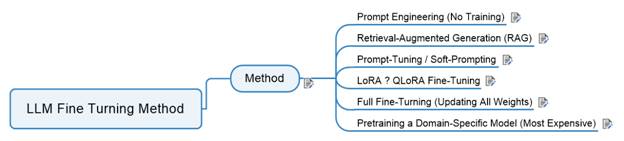
1 Method......................................................................................................................................... 1
1.1 Prompt Engineering (No Training)........................................................................................ 6
1.2 Retrieval-Augmented Generation
(RAG)............................................................................... 7
1.3 Prompt-Tuning / Soft-Prompting........................................................................................... 8
1.4 LoRA ? QLoRA Fine-Tuning.................................................................................................... 8
1.5 Full Fine-Turning (Updating All
Weights).............................................................................. 9
1.6 Pretraining a Domain-Specific
Model (Most Expensive)...................................................... 9
LLM Customization Landscape — Comparison Table
|
Method |
What It Is |
Best For |
Pros |
Cons |
Cost |
Data Needed |
Skill Level |
|
1. Prompt Engineering |
Designing structured prompts, templates, system instructions |
Customer support, sales workflows, simple logic,
multi‑agent orchestration |
Free, fast, zero risk, works with any model |
Limited control, no domain reasoning |
$0 |
None |
Beginner |
|
2. RAG (Retrieval‑Augmented Generation) |
Vector DB + embeddings to “look up” business knowledge |
Policies, product catalogs, internal docs, knowledge bases,
ERP/BI |
No training, fresh data, scalable, model‑agnostic |
Doesn’t teach new skills, only improves factual grounding |
Low |
Medium (documents) |
Intermediate |
|
3. Prompt‑Tuning / Soft‑Prompting |
Training small adapters that steer model behavior |
Tone/style alignment, customer voice, lightweight domain
adaptation |
Cheap, fast, reversible |
Limited depth, no reasoning improvement |
Low |
Small curated dataset |
Intermediate |
|
4. LoRA / QLoRA Fine‑Tuning |
Training low‑rank matrices added to the model |
Domain reasoning, workflows, multi‑step logic, coding
agents, ERP/AI/BI |
Huge impact, affordable, runs on home GPUs |
Needs clean data, risk of overfitting |
Medium |
Medium–large high‑quality dataset |
Intermediate–Advanced |
|
5. Full Fine‑Tuning |
Updating all model weights |
Proprietary agent systems, specialized industries, deep
reasoning |
Maximum control, best performance |
Very expensive, large GPUs, maintenance burden, catastrophic
forgetting |
High |
Large curated dataset |
Advanced |
|
6. Domain‑Specific Pretraining |
Training a foundation model from scratch or near‑scratch |
Bloomberg‑style models, Med‑PaLM, defense tech |
Absolute control, can outperform general LLMs |
Millions of dollars, months of training, research team
required |
Very High |
Billions of tokens |
Expert / Research Team |
General Business Comparison Table
|
Business Need |
Best Method |
Why It Works |
|
Use company knowledge (policies, documents, product info) |
RAG (Retrieval‑Augmented Generation) |
Keeps information up‑to‑date, no model training
required, easy to maintain |
|
Make the AI understand your industry or workflows |
LoRA / QLoRA Fine‑Tuning |
Strong improvement in reasoning for low cost; efficient for
most businesses |
|
Control how the AI behaves in workflows or processes |
Prompt Engineering |
Fastest and cheapest way to shape AI behavior; no training
needed |
|
Match your company’s tone, voice, or brand style |
Soft‑Prompting / Prompt‑Tuning |
Lightweight customization that adjusts style without heavy
training |
|
Build a deeply customized internal AI system |
Full Fine‑Tuning (optional) |
Gives maximum control when your business needs unique internal
reasoning |
|
Create your own proprietary AI model |
Pretraining |
Only for large enterprises with major budgets; used when full
ownership is required |
1.1 Prompt Engineering (No Training)
What it is: You design
structured prompts, templates, and system instructions.
Best for:
·
Customer support scripts
·
Sales workflows
·
Simple business logic
·
Multi‑agent
orchestration (your specialty)
·
Pros:
·
Free
·
Fast
·
Zero risk
·
Works with any model
·
Cons:
·
Limited control
·
Not enough for domain‑specific
reasoning
1.2 Retrieval-Augmented Generation (RAG)
What it is: You keep your
business data in a vector database and let the model “look up” facts instead of
memorizing them.
Best for:
Policies
·
Product catalogs
·
Internal documents
·
Knowledge bases
·
ERP/BI data (fits your enterprise background)
·
Pros:
No model training
·
Data stays fresh
·
Highly scalable
·
Works with small or large models
·
Cons:
·
Doesn’t teach the model new skills
·
Only improves factual grounding
1.3 Prompt-Tuning / Soft-Prompting
What it is: You train a
small “adapter” that modifies the model’s behavior without touching the base
weights.
Best for:
·
Tone/style alignment
·
Customer‑facing
voice
·
Lightweight domain adaptation
Pros:
·
Very cheap
·
Fast to train
·
Reversible
Cons:
·
Limited depth
·
Doesn’t fix reasoning gaps
What it is: You train small
low‑rank matrices that
plug into the model.
Best for:
·
Domain‑specific
reasoning
·
Industry‑specific
workflows
·
Multi‑step
logic
·
Coding agents
·
ERP/AI/BI tasks (your wheelhouse)
Pros:
·
Huge impact
·
Cheap compared to full fine‑tuning
·
Works on your home lab GPUs
Cons:
·
Needs clean, high‑quality
data
·
Can overfit if done poorly
1.5 Full Fine-Turning (Updating All
Weights)
What it is: You retrain the
entire model on your business data.
Best for:
·
Proprietary agent systems
·
Highly specialized industries
·
When you need the model to think like your company
Pros:
·
Maximum control
·
Best performance
Cons:
·
Very expensive
·
Requires large GPUs
·
Hard to maintain
·
Risk of catastrophic forgetting
1.6 Pretraining a Domain-Specific Model
(Most Expensive)
What it is: You start from
scratch or from a foundation model and train on billions of tokens.
Best for:
·
Companies like Bloomberg, Med‑PaLM,
or defense tech
·
When you need a proprietary foundation model
Pros:
·
Absolute control
·
Can outperform general LLMs
Cons:
·
Millions of dollars
·
Months of training
·
Requires a research team